Sunday, November 6, 2016

Matt Abrahams: Tips and Techniques for More Confident and Compelling Presentations

The ability to present your ideas in a clear, confident, and authentic manner can make a huge difference in your business (and personal) success. Yet many people are anxious or under-practiced in presenting effectively. The best way to feel more confident and deliver engaging presentations is through smart and thorough preparation and practice. From first planning through actual delivery, these tips and techniques can help you be a more compelling speaker and ensure your audience gets your message.
Part One, Planning Your Presentation

Start with a Key Question

Ask Yourself,  What does my audience need to hear from me?
Many speakers are anxious because they feel they are under the harsh spotlight of an audience who is constantly evaluating them. But, interestingly, incorporating questions from the moment you start planning can help you feel more confident about every aspect of presenting. Here are two ways to use questions in planning that will help you structure your presentation, and even improve your delivery:

Ask Yourself, “What Does My Audience Need to Hear From Me?”

Instead of seeing speaking as a performance, think of it as being in service of your audience’s needs — this shifts the attention away from you and onto your audience. The most useful way I know to focus on your audience is to start by asking yourself the simple question: “What does my audience need to hear from me?” This not only helps you tailor your message to your audience, but it also reminds you that they are the ones in the spotlight. Make this question your mantra as you prepare and practice your presentations.

Outline Your Talk Using Questions

When writing your next outline, create a list of questions to serve as prompts for what you intend to say. I loathe speaking manuscripts and full-text speaker notes, which only invite memorization and actually increase performance anxiety. An outline, on the other hand, is a very practical tool to help speakers prepare and deliver. And the power of a question-based outline is twofold:
  1. It allows you to feel more confident because you know the answers to your questions — you no longer need to worry you might not know what to say.
  2. You will be more conversational, since you are simply answering your audience’s unasked questions, and conversational delivery is often better remembered by audiences.

Know Your Audience’s Perspective, and Give Them a Reason to Care

Audiences need help to remember your content. Unfortunately, the norm for audiences is to “sit back and take it.” This results in unengaged audiences who are often left to find meaning in the presenter’s message. With careful crafting, you can include core relevance and an emotional hook in your presentation that will facilitate your audience’s remembering what you say.

Be Relevant to Your Audience

As a speaker, your job is to be in service of your audience. You need to be sure that you make it easy for them to understand your message. I am not suggesting you “dumb down” your content. Rather, I argue you should spend time making sure your content is relevant and easily accessible to them. Relevance is based on empathy. You need to diagnose your audience’s knowledge, expectations, and attitudes, and then tailor your content to their needs, particularly when presenting statistics.
Too often, presenters deliver numbers devoid of context, which makes it hard for the audience to see their relevance, much less remember them. For example, I worked with a green technology company that is doing some wonderful things to save energy. During a presentation, one of their executives said their company had saved the United States one billion kilowatt hours of electricity. This certainly sounds like a big number, but since I am not an electrical engineer, the number means nothing to me. But then, the presenter translated this number by saying: 1 billion kilowatt hours is the equivalent of the entire United States not using power for 15 minutes. With this context, this number suddenly became much more relevant to my understanding, and more impactful. Clearly, context matters. By making it relevant, you make it memorable.
Another way to make things relevant is to connect your content with information your audience already knows. Analogies are a perfect tool for this. By comparing new information to something your audience is already familiar with, analogies activate the audience’s existing mental constructs, which allows for quicker information processing and understanding.
For example, when I teach the purpose and value of organizing a presentation, I often say that a presenter’s job is to be a tour guide. We then discuss the most important tour guide imperative: “Never lose the members of your tour group!” This analogy allows my students to leverage all of their experiences of being on tours to understand not only the importance of organizing a presentation, but other ideas, as well, such as setting expectations, checking in with audience members, transitioning between ideas, etc.

Include an Emotional Hook

Most of us can quickly recall where we were on Tuesday, September 11, 2001, yet far fewer of us can remember our whereabouts on Monday, September 10, 2001. The emotional toll of the terrifying and tragic 9/11 terrorist attacks demonstrates a truism that has been known since the ancient Greeks studied rhetoric: Emotion sticks. People remember emotionally charged messages much more readily than fact-based ones. In fact, modern scientists are finding that our emotional responses have a fast track to our long-term memory. So when possible, try to bring some emotion into your presentation, whether in the form of your delivery or the content itself.
Emotions are highly motivational, so think about the emotional response you want from your audience and then plan to present in a manner that reflects that response.
In planning your delivery style, ask yourself what emotional impact you want to have on your audience. Too often, presenters focus just on the actions or thoughts that they desire from their audience without thinking about the emotional response they want. Emotions are highly motivational, so think about what you want from your audience and then plan to present in a manner that reflects that response. In other words, your delivery style and tone need to be congruent with the emotional impact you desire. Yet at the same time, you want to be authentic and not theatrical. This requires forethought, and I recommend practicing in front of focus groups who can give you feedback on this emotional congruency.
Many of my more technical and scientific clients and students challenge me on my assertion that emotion is important. They argue that their presentations are often highly specialized and detailed, and that emotion doesn’t play a role in those types of talks. I disagree. Even the most technical talks can have some emotional aspect, especially if you focus on the benefits or implications of the science or technology. Benefits are inherently emotional — saving time, saving money, saving trees, saving lives … these are things people care about.
Be authentic, not theatrical.
I once worked with a start-up company that sold antivirus software for large computer networks. Their standard presentation was loaded with facts and data points, and unfortunately most of the presentation was less than memorable. But with some minor additions that focused on protecting data and keeping users safe, the presentation became much more memorable because now it had an emotional hook.
By adding emotion, relevance, and variety to your presentation, you can be sure the audience will remember what they hear and see. The techniques and approaches I have described will also help you be more comfortable and confident in your presenting, which will only amplify your positive impact on your audience.

Structure Sets You Free

A powerful way to help you remember your presentation — and ensure that your audience retains what you say — is to plan your content using a meaningful structure. Research shows that people retain structured information up to 40% more reliably and accurately than information that is presented in a more freeform manner. There are many presentation structures on which you can rely, including:
  • Past-Present-Future — good for providing a history or reviewing a process
  • Comparison-Contrast — good for showing the relative advantages of your position
  • Cause-Effect — good for helping people understand the logic of your position
  • Problem-Solution-Benefit — good for persuading and motivating people
  • What?-So What?-Now What? — good for leading people to a call to action
Having a structure helps you remember what you plan to say, because even if you forget the specifics, you can use the general framework to stay on track. For example, when using the Problem-Solution-Benefit structure, you first lay out a specific problem (or opportunity), then you detail a solution to address the problem, and finally you define the benefits to your solution. If you are in the middle of the Solution portion of your talk and you blank out, then by simply thinking back to your structure, you know that the Benefit portion comes next.
My favorite structure is What?-So What?-Now What? This useful structure can help you not only in planned presentations but also in spontaneous speaking situations, such as job interviews. When using this structure, you start with your central claim (“I am qualified for this position because of my experience”) and then explain its importance or value (“This experience will allow me to start contributing to your firm immediately”) before concluding with a call to action or next steps (“So when can I start?”).
Part Two, Practice and Preparation

Use Variation in Sight, Sound, and Evidence to Connect with Your Audience

Your job as a presenter is to engage your audience, to pull them forward in their seats. Unfortunately, audiences can be easily distracted, and they habituate quickly. To counter these natural tendencies, you must diversify your material to keep people’s attention, with variation in your voice, variation in your evidence, and variation in your visuals.
You have likely been the victim of a monotonous speaker who drones on in a flat vocal style, like Ben Stein’s character in Ferris Bueller’s Day Off. Adding variation in your volume and speaking rate will help keep your audience’s attention and motivate them to listen. And by speaking expressively, your passion for your topic comes through. However, for many presenters, this type of speaking is not natural. I often instruct less expressive speakers to plan their presentations by infusing them with emotive words, such as “excited,” “valuable,” and “challenging” — then, when they’re actually presenting, they inflect their voice to reflect the meaning of these words. For example, when you are speaking about a big opportunity, then speak “big” in a big way. With practice, you will feel more comfortable with this type of vocal variety.
Try providing three different types of evidence, such as a data point, a testimonial, and an anecdote.
Varying the type of evidence you use to support the claims in your presentation is equally important. Too often, presenters exclusively use their favorite type of evidence. You might over-rely on data or on anecdotes. But both qualitative and quantitative academic research has found that triangulating your support provides more compelling and memorable results. So, try providing three different types of evidence, such as a data point, a testimonial, and an anecdote. This triangulation neatly reinforces your point, and it allows your audience multiple opportunities to connect with your idea and remember it, which is why it’s a technique often used by advertisers to reinforce that you should buy their product.
By varying your voice and evidence, you will make the words you speak more memorable. But what your audience sees is also critical. Just as a monotonous speaker can cause mental shutdown in an audience, repetitive body movements, and slides jammed with words can fatigue and distract an audience. People are very poor multitaskers. When distracted by spurious gestures or a wall of bullet points, audience members have fewer cognitive resources available to remember the content of what you’re saying. To increase the variety of your nonverbal delivery (e.g., gestures and movement), audio record yourself delivering your presentation, then play the recording while you move and practice your gestures. Since you do not have to think about what to say, you can play with adding variation to your body movement without the distraction of speaking.
To address the issue of slides that are “eye charts” full of details in small fonts, challenge yourself to think visually. Is there an image that could represent your point in a more meaningful way? Could you create a diagram or flow chart to help get your point across to your audience? A useful tool to get your creative visual juices flowing is Google Images. Type in the concept you are trying to convey and see what comes up in the search results. The images you find might have copyright issues, so I don’t recommend using everything you find, but you’ll get an idea of the type of visual variety that is possible.

The Right Way to Practice

Practice is clearly important for delivering an effective presentation; however, many presenters don’t practice properly. They simply mentally rehearse or flip through a slide deck, passive approaches that don’t really simulate the conditions of a presentation. To practice effectively, you also need to stand and deliver — even if you are presenting virtually, you need to physically stand up to project effectively. Rather than only thinking through a presentation, standing up and practicing your speech helps you remember it. Specifically, hearing your own voice and using relevant, appropriate gestures improve later recall. You remember more because your mental imagery and physical practice use overlapping neural networks in your brain, improving what’s known as memory consolidation, or the process by which a thought becomes cemented into your long-term memory.
Don’t memorize.
One very useful technique, called focused practice, involves taking one aspect of your presentation — say, the introduction — and delivering it repeatedly until you become highly familiar and comfortable with it. (You should not memorize your presentation, because memorizing invites blanking out.) Next, you move on to another aspect of your presentation, such as transitioning between two specific visual aids. Focused practice allows you to feel less anxious because you do not have to spend valuable mental effort thinking about all the particular aspects of your presentation at once.
The location where you practice your presentation should be in the place where you’ll be presenting, or at least in a similar place. For example, if you are going to give a speech in a large room with big windows where people are quiet and attentive, you should practice giving the speech in a large room with windows. The context in which you learn helps you remember and will boost your confidence, since the surroundings will feel comfortable. This advice also works for presenting via the Web or teleconference. Practice in the room with the technology that you will be using. In fact, practicing with the technology in advance is always a good idea.

Managing Anxiety

Video of Managing Anxiety

Presentation Hygiene: The Good Habits of Effective Speakers

Your parents were right! By eating healthfully, keeping fit, and sleeping well, you can improve your well-being — plus help alleviate your presentation anxiety and improve your memory, increasing the chance that you’ll remember all your points in a presentation. Like a long-distance runner carbo-loading for a marathon, you will find it helpful to eat certain foods — in this case, to facilitate memory formation and retention — ahead of your presentation. Complex carbohydrates, nuts, oils, foods rich in omega-3 fatty acids, and foods that contain flavanols (such as grapes, berries, apples, and cocoa) are good choices. Avoid simple sugars and sweets because they provide a quick energy boost that is often followed by sluggishness and mental haziness. And plan your caffeine consumption wisely: Caffeine facilitates creativity and productivity, but it also invites jitters, dry mouth, and flighty memory. It may make some sense to go for the triple mocha latte when you’re preparing a speech, but it’s not a good idea the day of. (Remember, the effects of caffeine linger in the body for a number of hours.) Finally, it may be tempting to use alcohol to calm your nerves, but evidence suggests it causes forgetfulness and “loosens the tongue,” which could lead to regret.
A healthy diet, proper rest, and exercise can help alleviate your public speaking anxiety.
Exercise plays an important role in both memory and anxiety resilience. Fit presenters respond better to both the mental and physical aspects of stress. Additionally, physical activity increases lung capacity and bolsters mental focus, two very important aspects of speech delivery. Finally, exercise provides an avenue for releasing pent-up anxiety and stress. Try to go for a quick swim, jog, or walk prior to writing or practicing a speech. The resulting calming effect comes not just from getting outside and distancing yourself from the stressor, but also from your body’s natural endorphins, which are often released when you exercise. Memory research clearly shows that the less stressed you are, the more information you will retain. Exercising after practicing a presentation can help, too: Short, intense bursts of exercise that follow new learning have been shown to increase memory retention.
Sleep is also critical. Good-quality, deep sleep prepares your brain for learning and consolidates newly learned memories so that you can recall them more easily. When you are preparing a speech, pulling an all-nighter is the worst thing you can do.
Part Three, Presenting

Use Questions to Connect with the Audience

Audience connection is the key characteristic that distinguishes a memorable presenter from an average one. Are audience members participating with the speaker, or simply listening to the speaker? Questions provide a great way to foster engagement. Questions by their very nature are dialogic. They’re two-way: You ask and your audience responds. I recommend using three types of questions throughout your presentation to get your audience’s attention:

Rhetorical Questions Build Intrigue

Asking your audience a question for effect (rather than one you expect them to actually answer) prompts them to think about the issue.
Example: “Would you believe that companies are making robotic honeybees to pollinate crops in locales where bees are dying off?”

Polling Questions Make the Audience Part of Your Point

When asking your audience to respond to your query, be sure to signal how you want them to do so (e.g., model raising your hand as you ask your question, or explain how the online poll works if you are virtually presenting) and comment briefly on the response you get (e.g., “Just as I expected, about 50% of you … ”).
Example: “How many of you have ever been stung by a honeybee?”

“What if?” Questions Root Your Presentation in Time

Inquire about a possible future or the historical past; and as with rhetorical questions, you may not expect a literal response, but you definitely focus your audience’s attention on the time period you’re describing.
Example: “What would it be like if all crops were pollinated by robo-honeybees?” Or, “Remember when modern science made it possible for genetically modified vegetables to yield more crops?”

Body Language

Video of Body Language

The Art of the Graceful Recovery

Drawing a blank when you’re standing before an audience can have dramatic and traumatic implications. Consider politicians and how memory gaffes can damage their credibility. For example, Texas Gov. Rick Perry suffered a long memory lapse during an early November 2011 nationally televised debate among U.S. Republican presidential candidates. Perry’s painfully awkward stumble provided endless fodder for political observers, media pundits — and stand-up comedians. So what can you do if you forget parts of your presentation?
First, try not to be too hard on yourself. Often, speakers blurt out comments that reduce their credibility: “Sheesh, how could I forget?” “I’m so nervous” or “I can’t believe how stupid I am!” If you must overtly acknowledge your forgetfulness, simply apologize and collect your thoughts.
One of my students once addressed her forgetfulness in a clever way that portrayed a potentially negative occurrence as a byproduct of a positive trait: “You’ll have to excuse me, but I am so passionate about my topic that I sometimes get ahead of myself. Allow me to review my previous point.” Most audiences are very forgiving, and some may actually be thankful for the pause because it allows them time to process what you’ve presented.
To help get yourself back on track, focus on what you’ve just said. Too often, people who blank out try to figure out what they need to say next. But you are more likely to continue smoothly if you reorient yourself by looking to what you said previously.
The following techniques can help you get past a memory block:

Paraphrase Your Previous Content

Pausing to say, “So just to step back for a moment, I’ve already covered how X and Y are relevant … ” gives you a moment to remember point Z, and even frame it as a point you’ve been building toward.

Ask Your Audience a Question — Maybe Even a Rhetorical One

“What seems to be the most important point so far?” Asking a rhetorical question not only provides you with a chance to collect your thoughts, but it also boosts your confidence because you know the answer, and launching into that answer will likely get you back in the flow.

Review Your Overall Speaking Purpose

“So we can see that [insert your core message] is really important.” This option works well when you are struggling to remember your place at big transition points because it allows you to return to the overall importance of your message. Mistakes happen. It’s a simple fact of life. But when you’re in front of a roomful of people and you’re trying to think of your next point, but all you can picture is … nothing, the key to a graceful recovery is to step back for a moment and regain your bearings.

The Power of the Paraphrase

When you are giving a public presentation, don’t you hate it when you face … the dreaded question. You know the one: the emotionally loaded challenge that serves to undermine everything you presented prior. You had hoped you wouldn’t get it, but here it is. Or, you may face … the obnoxious meeting participant. You know this guy: He thinks he’s Mr. Smarty-Pants and wants everyone to know it. He ruins your meeting by going on long rants that contribute little and waste much.
These two situations can make even the most confident and calm speaker nervous. One powerful way to navigate your way through these two tricky communication situations is to rely on paraphrasing. Paraphrasing is a listening and reflecting tool where you restate what others say in your own words. The most effective paraphrases concisely capture the essence of what another speaker says. For example, at the end of your presentation a questioner asks: “In the past you have been slow to release new products. How soon will your new product be available?” You might paraphrase her question in one of the following ways:
  • “You’re asking about our availability.”
  • “You’d like to know about our release schedule.”
  • “Our release timeline will be … ”
Effective paraphrasing affords you several benefits. In Q&A sessions, for instance, it allows you to:

Make Sure You Understood the Question Correctly

After your paraphrase, the question asker has the opportunity to correct you or refine his or her question.

Think Before You Respond

Paraphrasing is not very mentally taxing, so while you are speaking your paraphrase you can begin to think of your response.

Acknowledge Emotions Prior to Addressing the Issue(s)

Occasionally, you may find yourself confronted with an emotionally laden question. In order to be seen as empathetic, and to get the asker to “hear” your answer, you should recognize the emotion as part of your paraphrase. To a questioner who asks, “I get really exasperated when I try to use some of your features. How are you going to make it easier to use your product?” you might say: “I hear that you have emotion around the complexity of our offering.” By acknowledging the emotion, you can more easily move beyond it to address the issue at hand. Please note that you should avoid labeling the emotion, even if the asker does. If someone seems angry, it is better to use terms such as “strong emotion,” “clear concern,” and “passion.” I have seen a number of speakers get into a labeling battle with an audience member when the speaker names a specific emotion that the asker took offense to (e.g., saying an audience member seems frustrated when he is actually angry).

Reframe the Question to Focus on Something You Feel More Comfortable Addressing

Try One of the Following Lines to Help You Start Your Paraphrase: The central idea of your comment is... So what you are saying is... What is important to you is...
I am not recommending pulling a politician’s trick and pivoting to answer the question you wanted rather than the one you got. Instead, by paraphrasing, you can make the question more comfortable for you to answer. The most striking example I have come across was in a sales situation where a prospect asked the presenter: “How come your prices are ridiculously expensive?” Clearly, the paraphrase “So you’re asking about our ridiculous pricing” is not the way to go. Rather, you can reframe the issue in your paraphrase to be about a topic you are better prepared to address. For example, “So you’d like to know about our product’s value.” Price is clearly part of value, but you start by describing the value and return on investment, which will likely soften the blow of the price.
Using paraphrases can also help you in facilitation situations, such as a meeting. In meetings, paraphrasing allows you to:

Acknowledge the Participant’s Effort

For many people, contributing in meetings can be daunting. There are real consequences for misspeaking or sounding unprepared. By paraphrasing the contributions you get from others, you validate the person’s effort by signaling that you really listened and valued their input.

Link Various Questions/Ideas

You can pull together disparate contributions and questions and engage different participants by relating a current statement to previous ones. For example, you might say: “Your comment about our profitability links to the question a few minutes ago about our financial outlook.”

Manage Over-contributors

Someone who over-shares or dominates a meeting with his or her opinions can be very disruptive and disrespectful. If it is your meeting, then the other participants will expect you to manage the situation. If you don’t, you will lose control and potentially credibility. Paraphrasing can help you move beyond the over-contributor while looking tactful. Fortunately, even the most loquacious person needs to inhale once in a while. During a pause, simply paraphrase a meaningful portion of the person’s diatribe and place focus elsewhere — to another person or topic. For example, you might say, “Forrest’s point about manufacturing delays is a good one. Laurie, what do you think?” Or, “Forrest’s point about manufacturing delays is a good one. What other issues are affecting our release schedule?” In both cases, you have politely informed Forrest that he is done, and you’ve turned the focus away from him and back to your agenda.
Beginning a paraphrase can sometimes be tricky, and people often ask me for suggestions for ways to initiate their paraphrases. Try one of the following lines to help you start your paraphrase:
  • “So what you are saying/asking is … ”
  • “What is important to you is … ”
  • “You’d like to know more about … ”
  • “The central idea of your question/comment is … ”
Paraphrasing has the power to help you connect with your audience, manage emotions, and steer the conversation. And once you begin to use the technique, you will realize it has the power to help you not only in presentations and meetings, but in virtually any interpersonal conversation.

Avoiding Speaking Habits That Can Damage Credibility

Even the most confident and compelling speakers can work against themselves by allowing certain credibility-killing words and vocal habits to creep into their presentations. As a presentation skills coach and teacher, I often hear presenters chip away at their command of the room with three common speaking habits: hedges, tag questions, and up-talking. These verbal and vocal habits cause an audience to pause and question the assertiveness and commitment of a presenter. Here’s what they are, and how to stop them.

Hedges

Hedges are soft word choices such as “I think,” “sort of,” or “kind of” that litter many a presentation. In some interpersonal conversation situations, phrases such as these can actually help by allowing you to appear less dogmatic and more open to collaboration. But in presentations, hedges have the effect of softening your position, reducing your authority, and making you seem wishy-washy and unsure of what you are saying.
The best way to address hedging? Substitution. Find stronger, more powerful words to replace these less assertive ones. For example, “I think” becomes “I believe” or “I know.” “Kind of” and “sort of” can be replaced with “one way.” Finding more assertive substitutions affords you a way to make your point more clearly and definitively.

Tag Questions

These occur when you add a question to the end of a phrase, such as “This is a good hamburger, isn’t it?” Again, in interpersonal situations tag questions can work in your favor, in this case by inviting participation from your interlocutor.
In presentations, hedges have the effect of softening your position, reducing your authority, and making you seem unsure of what you are saying.
But when speaking before an audience, tag questions diminish your potential impact, and should be eliminated. The first step to ridding yourself of tag questions — or any verbal tic for that matter — is to become aware of when you are speaking them. To raise your awareness, you can have a colleague notify when you have asked a tag question or you can record yourself speaking and note them yourself. In either case, you are moving an unconscious speech act into consciousness. Eventually, you will transition from recognizing that you just asked a tag question to noticing that you are about to ask a tag. When this anticipatory awareness exists, you will be able to eliminate asking these superfluous questions. Removing them will take practice for those in the habit of using them, but the benefit to you is a stronger, more assertive speaking style.

Up-talking

This habit centers not on the words you choose but rather on how you speak your words — specifically at the end of your sentences. If you are an up-talker, then the ending of your sentences rises in pitch, essentially making your declarative sentences sound like questions. Nothing can be more confusing (and annoying) to an audience as when a speaker makes an important point like “our profits are expanding,” yet it sounds like “our profits are expanding?” Your goal as a speaker is to use your voice — its volume, cadence, and tone — to help your audience understand your message, not to confuse them.
The best way to correct up-talking is to focus on your breathing. If you are an up-talker, then you likely take a quick inhalation prior to the end of your sentences because feel you are running out of air to support the remainder of your spoken thought. This inhalation is often followed by a rise in pitch. To address this, you need to practice what I term “landing” your sentences and phrases. Rather than inhale close to the end of your sentences, focus on exhaling completely as you finish your thought. (This does not mean lower your voice volume, but instead empty out your breath while maintaining your volume.)
A useful way to practice this is to read out loud while placing a hand on your belly. When you up-talk, your belly will contract inward as you end your sentence (this results from your inhalation). If you land your phrase, your belly will extend with your exhalation at the end of your sentence.
When you’re giving a presentation, it’s critical to command the room — if your audience doesn’t believe you’re confident and credible, they won’t even consider what you’re actually saying. Among the many ways to do this are smart word choice and speaking your words powerfully. Bad habits like hedges, tag questions, and up-talking distract your audience and undermine your impact. But with awareness and practice, you can eliminate them so that you appear more commanding and your message seems clearer and stronger.

TED Talk Takeaways: 8 Ways to Hook Your Audience

“You will live 7.5 minutes longer than you would have otherwise, just because you watched this talk.
This was the claim that video game designer Jane McGonigal presented to the crowd during her June 2012 TED talk. As the camera panned over the members of the audience, their faces showed universal skepticism: Was this lady serious?
There was something else interesting about that crowd. Despite their doubtful visages, everyone in the audience was drawn in by McGonigal’s words. No one was checking their email, talking to their neighbor or looking at the camera circling in front of them; all eyes were fixated on the (potentially crazy) speaker.
Great hooks, like McGonigal’s provocative opening statement, get audiences on the edge of their seats and give them a sense of what’s coming. They allow you to win a crowd’s attention right away and give you a legitimate chance to have a lasting impact.
Consider the alternative: Have you ever witnessed a presentation where a colleague starts by saying something like, “OK, so we’re going to run through a few major takeaways from last quarter and hopefully be out of here within the hour?” Snooze! All that has you thinking about is whether you should go to the bathroom now or in 20 minutes.
Starting your presentation in an unorthodox way provides your audience with a much-needed breath of fresh air. McGonigal used a provocative statement to start her presentation, but there are plenty of other ways to be just as effective. Which one works best for you, of course, will depend on your presenter type, which you can determine using our helpful survey. Let’s take a look at the eight most popular presentation hooks, drawn from the top 100 most-viewed TED talks.
1. Story: The most popular type of hook comes naturally to the majority of people. Telling a story or sharing an experience is something we do every day without PowerPoint, so bringing it into your presentation should be a breeze. A story reminds your audience that you are a human being -- a bit of framing that can go a long way. You become more relatable to the audience, which allows your message to get through unobstructed.
2. Video/Graphics: Some topics are best introduced without words. Instead of telling the audience how a new product works, show them; humans have excellent imaginations, but sometimes it’s easier to do the work for your audience. Graphics that are compelling and that can complement your talk track are especially useful for presenters who may not have a way with words. Let multimedia lend you a hand.
3. Belief Statement: We all have our opinions, and hearing someone who agrees or disagrees with them will always grab our attention. If you have a controversial opinion tied to your presentation, use it as your hook! There will be detractors, but even they will want to hear your reasoning.
4. Intriguing Structure: Mapping out where your presentation is headed provides your audience with a path and adds a sense of drama. As you move from section to section, your audience will excitedly anticipate each topic that you’ve previewed, especially if it’s a subject that they are particularly interested in. No one will wonder what’s next or when the next break is; with everyone on the same page, all focus will be on the task at hand.
5. Humor: Not an easy task, but if you’ve got a good joke in your arsenal (that’s relevant), use it. If you can get people laughing, they will feel more comfortable and you will feel more confident. Try out your joke on a friend first, though, because few people handle *crickets* well.
6. Rhetorical Question: If you want your audience to participate, ask them to. It seems simple, but if you pose a question to the audience, even if you don’t expect an answer, you’ll have people participating mentally. Rhetorical questions also are great for effect; sometimes, a few moments of silence can be the best hook.
7. Provocative Statement: Remember our friend Jane McGonigal? By starting her presentation with words she knew she would prickle her audience, she easily drew them in. A provocative statement is like a belief statement on steroids; you’re stating how you feel and inciting a major reaction.
8. Shock/Surprise: This hook type isn’t appropriate for all presentations (you shouldn’t be saying, “I will be in charge in 5 years,” with your boss in the room.) But, used appropriately, a surprising comment can pique an audience’s interest by, frankly, making them uncomfortable. Always consider it, but use with caution.
Be logical about which hook you choose and, perhaps most importantly, be honest with yourself. Are people going to laugh at your joke? Does that story really have any relevance? The audience is the only true judge of your hook, so make sure you don’t overlook how they will react.

36 Ways to Make a Killer Business Presentation

What makes a good business presentation? Bombarding your audience with information isn't it. Neither is boring them to death with charts and figures. And forget about reading every one of those 20 bullet points you've crammed into each PowerPoint slide (note: this is definitely a don't). What really makes a good business presentation boils down to one thing: engaging your audience.
Granted, getting an audience involved and truly tuned in to a business presentation is easier said than done. Nonetheless, the quality of your presentation can mean the difference between persuading your audience and wasting their time. To help you knock your next gig out of the park, Business News Daily asked presentation coaches, speechwriters and business owners everywhere for their advice and the do's and don'ts of public speaking. Here are 35 tips, tools and secrets to making killer business presentations, regardless of your topic and audience.
No. 1: Be your own stage manager. Check out ahead of time where you will be presenting, find out about the setup, make sure you have tested all your AV. Move the chairs, if needed. Check the room temperature. Remember, hot rooms put people to sleep. — Lydia Graham, CEO, Graham & Associates [For a side-by-side comparison of the best presentation software, visit our sister site Top Ten Reviews]
No. 2: A good business presentation contains only the necessary information. It has one main point and everything is structured around that point. It doesn't rely heavily upon PowerPoint or slides filled with text, and it allows time for discussion and asking questions. — Eddie Rice, speechwriter, CustomSpeechWriting.com 
No. 3: Keep it short and impactful. Your audience will pick up quickly on the fact that you simply enjoy hearing yourself talk if your presentation goes on too long. You should also provide a takeaway. Even if it is a link to a website that gives a free report, if you leave the audience with something, you increase the value that you've provided. — Holly Rodriguez, chief communications strategist, H-Rod & Associates
No. 4: Remember, when making a business presentation, PowerPoint is not *the* point. Your job is to present the information. If your audience can take away just as much by reading it, you are superfluous. Also, I'm sure there is a special room in hell for presenters who merely read their slides to the audience. They deserve it. — John F. Dini, executive business coach, The Alternative Board (TAB)
No. 5: No secret sauce, tech, or gimmicks. What makes any presentation engaging and effective is to put the bottom-line up front (BLUF)and then provide whatever backup data which may be needed. I've seen many presentations where the story is dragged out and tension is built, as if the person was trying to make a movie and build to the climax. But most people appreciate getting to the climax quickly without lots of buildup or foreplay. It isn't a movie and it isn't sex — people are busy and need to deal with the issue and then move on. — Mark McMillion, president, McMillion Leadership Associates LLC
No. 6: Use body language to connect with your audience. Dynamic presenters use their hands, facial expressions, and eyes to keep the audience engaged. If possible, use props and stage movement to keep the audience interested. — Matt Reischer, chief information officer, Legal Marketing Pages Corp.
No. 7: The presenter should be the star, not his or her slides. You want to be a critical part of the presentation. Focus more on what you will say and how you will say it rather than on having the coolest slides. Not everything you say should be on your slides. Focus on your best insights and ideas, or the coolest thing about what it is you are trying to sell. No more than 3 sentences per slide. Present your best data, or no data, not all your data. — Michal Ann Strahilevitz, Ph.D., professor of marketing, Golden Gate University
No. 8: The best way to improve a business presentation is to exceed audience expectations. Sometimes, less is more. The best presentations I have done to buyers for my company at Royce Leather have been presentations in which I used no technology at all. If using technology, the key is to utilize high definition images and short, less than 60 second videos to convey your point. — Andrew Royce Bauer, CEO, Royce Leather
No. 9: As an engineer, we always tried to be as technical as possible to show people we knew our stuff. Now I act as an expert witness in cases where cell phones are used as evidence. My first job is to teach a jury how cell phones work. I've learned to put myself in the seat of someone who's completely out of my field, but still intelligent in their own right. Keeping it simple is key. Assume they are smart but know nothing and teach the way you would want to be taught. — Ben Levitan, telecommunications expert witness, BenLevitan.com
No. 10: Your presentation should trigger a reaction from your audience. Some examples:
  • Whoa! = Could you say that again or their nudging the person next to them, asking what did he/she say? (You need this to break into the clutter of people's ADD, OCD and preoccupied minds)
  • Wow! = Yep, that really was worth repeating and hearing again
  • Hmmm = I'm writing that down, because that is just too good to not use somewhere
  • Yes! = I just found out where I'm going to use it (and then they do)
—    Dr. Mark Goulston, business psychiatrist and author, Just Listen Discover —    the Secret to Getting Through to Absolutely Anyone
No. 11: The key is simplicity! Simple explanations coupled with simple graphics equal one amazing presentation. People think you need to jam a bunch of data in the slides, but it's a huge mistake. Pick specific points to talk about and create simple graphics to re-enforce the point, not give the view extra information. — Gary Tuch, co-founder, Professor Egghead Science Academy
No. 12: Use natural humor (not jokes). Humorous quotes work well, especially during your introductions. For example, one section of my presentation skills workshop has to deal with speaking anxiety, and I usually begin this section with the following quote: "Mark Twain said it best: 'There are two types of speakers. Those that are nervous and those that are liars. Which one are you?'" This usually results in a chuckle or two from the participants in my workshop. — Lenny Laskowski, president and CEO, LJ Seminars
No. 13: What makes a good business presentation is practice, practice, practice! It's just like sports! You have to repeatedly practice your presentation to improve it. — Andrew J. Zurbuch, president, HealthPlanBrokers.com
No. 14: We would be lost without new technology like SlideShare and GoToMeeting. GoToMeeting helps us attract a nationwide audience and allows people to tune in, listen to, and engage with our presentations, no matter where they are. After a presentation is over, we immediately upload any visual aids to SlideShare, which helps us reach people who may have missed it. More than anything else we want to help small business owners, and thankfully the internet and services like GoToMeeting and SlideShare make that mission much, much easier. — Deborah Sweeney, CEO, MyCorporation.com
No. 15: Don't: a) be defensive, b) pretend you know something you don't, c) try to BS your way out of anything, and d) extend the presentation after it has run its course. — Tim Montgomery, president, TIMIT Solutions. LLC.
No. 16: Authenticity is engaging; let your true personality show. Too many presentations are technically proficient but lack heart. If you are not genuine, there will be an unbridgeable gap between you and your listeners. Authenticity is the most important element of an effective communication in any context. — Brandt Johnson, principal, Syntaxis Inc.
No. 17: Begin with a bang and finish with a flourish. Be more dynamic. Stand instead of sit. If you're talking about something big, make a balloon shape with your arms. Describing a surprise? Clap your hands loudly. Talking about a big step? Take a big step. Use drama: "It killed me," versus "It was disappointing." — Bill Rosenthal, CEO, Communispond
No. 18: Keep eyes on the audience even when using PowerPoint to maintain connection. Divvy the venue into sectors and designate one person in each sector to look at directly during the presentation so that the audience feels connected to you. — Albert Goldson, executive director, Indo-Brazilian Associates LLC
No. 19: My must-have toolkit combines a set of eight colored white-board markers and an arsenal of business experience. A quality presenter will take any agenda and any questions throughout a presentation, draw out key concepts in an interactive manner that engages the audience, and finish five minutes early so everyone is happy. Slide decks fail because they are linear, so you can't rearrange the order without looking disorganized. Too many presenters rely on technology to gloss over their flaws in memory or expertise. — Jacob Aldridge, international business coach, JacobAldridge.com
No. 20: Start with "why." You need to ask yourself: Why you are there to speak? What is the point of your speech? What do you hope to achieve? Keep your ego aside and understand that the audience is not there to watch you fail, but to find value in what you have to say. When it isn’t about you, it is much easier to reduce stage fright and convey the information in an interesting and engaging way. Keep the "why" at the center of your presentation and don't let fear take you off track. — Michelle Stansbury, founder and CEO, Little Penguin Public Relations
No. 21: One key is for presenters to determine which presentation style to use. If you're trying to entertain or inform a large audience, use ballroom style. If you're trying to persuade or educate a smaller audience, use conference room style. Two very different styles, but most mistakes occur when presenters confuse the two purposes. — Paul Radich, master trainer, Extreme Presentation
No. 22: The presenter should do an analysis of the audience and determine the best way to present to them. The delivery and the content should be specific and relevant to them. The presenter should know the purpose of the presentation and exactly what the end result is to be. In business, the end result is usually some form of action. — Glenn Schroeder, president, Glenn David Productions
No. 23: Keep it brief. If not, the consequences can be brutal: wasted time, money and resources; decisions made in confusion; and worthy ideas rejected. If you can’t capture people’s attention and deliver your message with brevity, you’ll lose them. Not sure if you’re brief enough? Ask yourself these 6 questions:
  • Can I hear an hour's worth of complex information and summarize it in a two-minute debrief? 
  • Do my PowerPoint presentations contain fewer than 10 slides, with plenty of images and little text? 
  • Can I translate complicated ideas into a simple story, analogy, or anecdote?
  • Can I expertly deliver headlines like a reporter? 
  • Do I speak clearly and concisely—in plain English rather than confusing corporate jargon?
  • Do I know instantly when I’ve "lost" somebody? 
Joe McCormack, founder, The BRIEF Lab
No. 24: Have a high energy level. It's the most important step to take in presentations. This applies to any type of speaking, any size audience and any topic. If you seemed bored or tired, that vibe will translate to your audience. — Ken Boyd, owner, St. Louis Test Preparation
No. 25: When going from topic to topic, good segues are important. Here are some ways to create great segues: Use Bridge Words, such as "furthermore," "meanwhile," "however," "consequently" and "finally." There are also Bridge Phrases, like "in addition to," "a similar example is," "do you remember when I said," "on the other hand," and "in conjunction with." And use Bridge Actions, such as by asking the audience questions, going point-by-point, using visual aid, pausing and physical movements. — Parker Geiger, CEO, CHUVA group
No. 26: Think about your speech rhythm. It's one thing to say don't be monotone, but there is more to it than that. You should be able to clap to your words. Listen to Barack Obama speak to get a feel for this. Good speeches have a rhythm like a song or a poem. — Bill Balderaz, president, Fathom Healthcare
No. 27: One absolute don't in presentations is reading slides. Tell stories and talk to the slides, but by no means read the slides. If you need notes, then keep those separate from the presentation content for use in meetings. — Justin Honaman, managing partner, Teradata
No. 28: You must be able to make the complicated simple. A confused mind NEVER buys, so focus on finding ways to make you the most OBVIOUS choice. — Michael Bremmer, CEO, Telecomquotes.com
No. 29: One concept that I've borrowed from the book Presentation Zen with great success is the 'take away.' What's the one point that you want to drive home? Your presentation should start by declaring a 'big idea' that will be the take away. You should follow with three or four points that support the big idea, and then bring it back around and restate the idea to summarize. — Michael Assad, vice president of sales and marketing, Argenia Systems Inc.
No. 30: Use visuals, not words. A great business presentation that is both effective and engaging must leverage visual storytelling in order to capture your audience's attention. This is proven by The Picture Superiority Effect, which found that concepts are more likely to be remembered if they are presented as pictures, rather than words. In fact, research has proven that visuals are recalled six times better than words alone. If you're using text-only presentations, it's time to rethink your strategy. — Tim Riesterer, co-author, Conversations That Win
No. 31: The biggest mistake presenters make is lack of preparation. They believe they can wing it — they know enough about the topic to just stand up in front of their audience and go. This idea is a total myth! Your audience can tell if you didn't prepare, and they will respect you less for it. — Andi Enns, marketing and public relations consultant, The Ethical Communicator
No. 32: Your audience may be viewing your slides on-the-go, so make sure your deck is mobile-optimized. Use highly contrasting colors, like white text on a black background, to increase readability and help your images stand out. In addition, text-heavy slides aren't well-suited for mobile screens, so look for opportunities to replace words with images. If you're using video presentation software, use a solution that automatically optimizes your presentation for the mobile device accessing it. — Joan Babinski, vice president of corporate marketing, Brainshark
No. 33: Respond to the audience like a DJ. Strive to create an experience. A good DJ pays attention to how people are responding and can adjust the mood in real-time. The same goes for presentations. You can prepare, yes. You can plan, yes. But, once on stage, it's the audience that will define what goes through and what is forgotten. Feeling their interests and responding is key. — Adam Somlai-Fischer, co-founder, Prezi
No. 34: Have different versions of your presentation for different situations (sales, informative, investment, etc.). And make sure to have an email-friendly PDF version you can send out afterwards that an individual can skim and get the gist without you having to be there to narrate each slide. —Jordan Warzecha, co-founder, backstitch
No. 35: People generally make this mistake when making business presentations: they list their achievements, the benefits or features of their product/service/cause or, heaven forbid, they talk about pricing. What should they be presenting? Their story. Stories give us context, and context helps everyone understand. Why did you start your company? How has this product helped other people? What difference am I/are we making? A good business presentation paints a vivid picture and helps you understand why you would want to do business, or continue doing business, with that company. — Christine Clifford, CEO and president, Christine Clifford Enterprises

No. 36: Choose the right presentation medium. For many presenters, PowerPoint is the default, and that's fine. However, PowerPoint gets a lot of criticism as the cause of poor presentations, but it is not the fault of PowerPoint if a presentation isn't good. You should pick a medium based on the audience. How big is it? What about the venue? Will you present live, face-to-face on stage before a big audience, via a web meeting or one-on-one in a coffee shop or conference room? What kind of technology is at your disposal? Consider all these factors as you determine which medium makes the most sense. — Jerry Rackley, chief analyst, Demand Metric Research Corporation

Doing the Line Charts Right

Lately I joined Datawrapper, an open source project that aims to provide simple, embeddable charts for journalists. Really, no fancy stuff here, we’re just talking about line charts and bar charts. Limiting ourself to those types gave us a good opportunity to think about the best of doing them. So it came that this week I was thinking a bit about the perfect line chart.

Listen to Tufte and keep it simple

Of course you cannot talk about perfect charts without mentioning the great books of Edward Tufte. Especially in the book The Visual Display of Quantitative Information he summed up a lot of good advices for line charts. He argued that it’s a good idea to look at what he called the data ink ratio and showed how the removal of certain chart elements can increase its readability. For instance you don’t need to draw a box around the chart area. Also you can use the ends of axis lines to display the minimum and maximum value in the data.

Forget about the separate legend

Separate legends are the worst-case scenario in the line chart world. Often one can find the legend below the chart, or in an arbitrary order. You want to allow instant identification of the lines, but forcing the viewers to look them up in a legend takes way too much time. Instead you should put the labels somewhere close to the lines.
The great side effect of putting the labels next to the lines is that you no longer depend on fancy colors or disturbing symbols to identify individual lines. Extra points for simplicity.

Highlight what’s important

Although it is possible to tell hundred stories using a single line chart, it makes a lot of sense to keep the focus on just one story. Therefore you should highlight just one or two important lines in the chart, but keep the others as context in the background.

Baseline zero or not?

Sometimes you hear the advice that every (line) chart should have a baseline of zero, otherwise it would be “lying”. As a counter-example, here’s the (approximate) intraday stock quote data of the Facebook IPO day using baseline zero. The reason why nobody shows stock charts this way is obvious.  
It’s almost impossible to see the ups and downs of the first day of the Facebook stock. Without the zero-baseline the chart reveals much more of the data.
However, to minify the risk of confusing the readers with a non-zero baseline chart, I suggest to not draw the axes as connected lines. This way the y-axis doesn’t visually ‘touch’ the ‘ground’.

Finding a nice aspect ratio

The big advantage of line charts is that they enable the comparison of slopes, which is not easily possible in a bar chart, for instance. The problem, however, is that the perceivable slopes are highly dependent on the aspect ratio of the chart. The Facebook stock data would have looked much more dramatic in a taller chart. So which aspect ratio to chose? Some years ago, William Cleveland suggested a technique called banking to solve this problem.The core idea is that the slopes in a line chart are most readable if they average to 45°. In 2006, Jeffrey Heer and Maneesh Agrawala continued the work of Cleveland and described 12 different banking algorithms. I used one of the most simplest of them, the median-absolute-slope banking.
Finally, here’s what the Facebook stock chart looks like after banking. The curve looks less dramatic now, but is still easy to read.
The problem with banking is that sometimes you need the chart in a certain aspect ratio to fit into a page layout. Especially if banking produces portrait sized charts. But why not let the optimal chart ratio define your layout? For instance, you can put the additional information to the side of the chart. Remember that the main goal of banking is to increase the readability of the line slopes. In the following example, the slopes for Nuclear and Renewables would have been much more difficult to see, if the chart would have been ‘squeezed’ to a landscape aspect.

Turning best practices into actual tools

At the end, I am very happy to say that these best practices won’t remain gray theory in research papers. Everything I mentioned will be integrated in the upcoming release of Datawrapper, which I already used to produce most of the examples in this post. Please follow @datawrapper if you want to keep up-to-date with the project.
If you have further suggestions or recommendations for line charts, I’m looking forward to read your comments.

The Dataviz Design Process: 7 Steps for Beginners

Does data visualization leave you feeling like this? If so, this beginner-level post is for you! bars_toppling_over
Data visualization requires two skillsets: technical skills to create visualizations in a software program and critical thinking skills to match your visualization to your audience’s information needs, numeracy level, and comfort with data visualization.
If you’re interested in learning more about technical skills, check out my Excel for Evaluation chart tutorials and my Dataviz Challenges.
If you’re interested in learning more about critical thinking skills, read on! This post outlines a 7-step Dataviz Design Process. My goal is to give you a behind-the-scenes look into the design process so that you feel armed and ready to begin editing your own charts.

Step 1: Select a single message to highlight in your chart

This is, admittedly, the least linear of all the thinking steps in the design process. Rather than relying on computer software or your programming skills, this step involves the most valuable computer of all—your brain. Here are several questions for you to consider: Who is my audience? Which chart is right for my data? How much precision is necessary?

Who is your audience?

Your audience should be your primary consideration. A chart designed for a group of foundation program officers will not be appropriate for a group of high school principals, and vice versa.
  • What’s your reader’s numeracy level? Do they enjoy or fear data? Unless you’re designing charts for a group of economists or statisticians, you can usually leave out details like the effect size, power analysis, and margin of error. Laypeople are often more interested in practical significance (the “so what?” and implications of findings) than in statistical significance.
  • What’s your reader’s dataviz literacy level? If they’re brand new to dataviz, stick with the traditional charts like pie charts, bar charts, and line charts—otherwise they’ll spend more timing ooh-ing and aah-ing over the chart’s novelty than paying attention to the information contained in the chart.
  • How much time do they have? Little time or interest: Simple static chart. Lots of time and interest: Interactive charts.
  • What types of decisions do they make? What information do they need? What information do they already have? What information are they expecting? How will your chart(s) add value for them?
And P.S., if you can’t think of how your chart will add value for the readers, don’t make one. Every chart needs a purpose and so what?

Which chart is right for my data?

It takes a while to understand all the different chart types and which one is best for your data. Some tips:
annkemery_gif_2

How much precision is necessary?

In my research and evaluation projects, I’m often trying to make big-picture, general statements about the findings. In other fields, precision is important.
As the chart creator, you have the freedom (and responsibility) to select how much precision is necessary. Your selection should be well thought-out and intentional. Your decision plays out in two ways: the chart type you select, and how you label the data points.
When selecting chart types, remember that some charts are better than others in displaying precision. For example, charts that rely on angles and area to show differences, like pie charts, are for communicating general patterns. Charts that rely on length to show differences, like bar charts, are for communicating specific details.
step1_general_vs_specific_patterns
A related decision is how exact your data labels will be. Will you include decimal places? How many? In this slope chart about Olympic records, the designer knew that showing precise measurements was crucial.

Hot tip: Surround yourself with charts

Print full-page, full-color charts and tape them near your desk. Surrounding myself with a variety of chart types, all of which have been used in different reports and for different groups of people, helps me create brand new charts easily. All I do is glance up at my gallery, and then I quickly figure out which chart is best for my new situation.
workspace

Hot tip: Explore preliminary patterns by doodling on paper

Step back from your software program. This is especially crucial if you’re using Excel or R (versus Tableau) where you usually need a solid idea of your chart’s design before implementing that design on the computer.
sketch, draw, and doodle plenty of drafts before I create anything on the computer. I also use quickie computer strategies, like Excel’s sparklines and conditional formatting, to help me narrow down the focus of my charts.
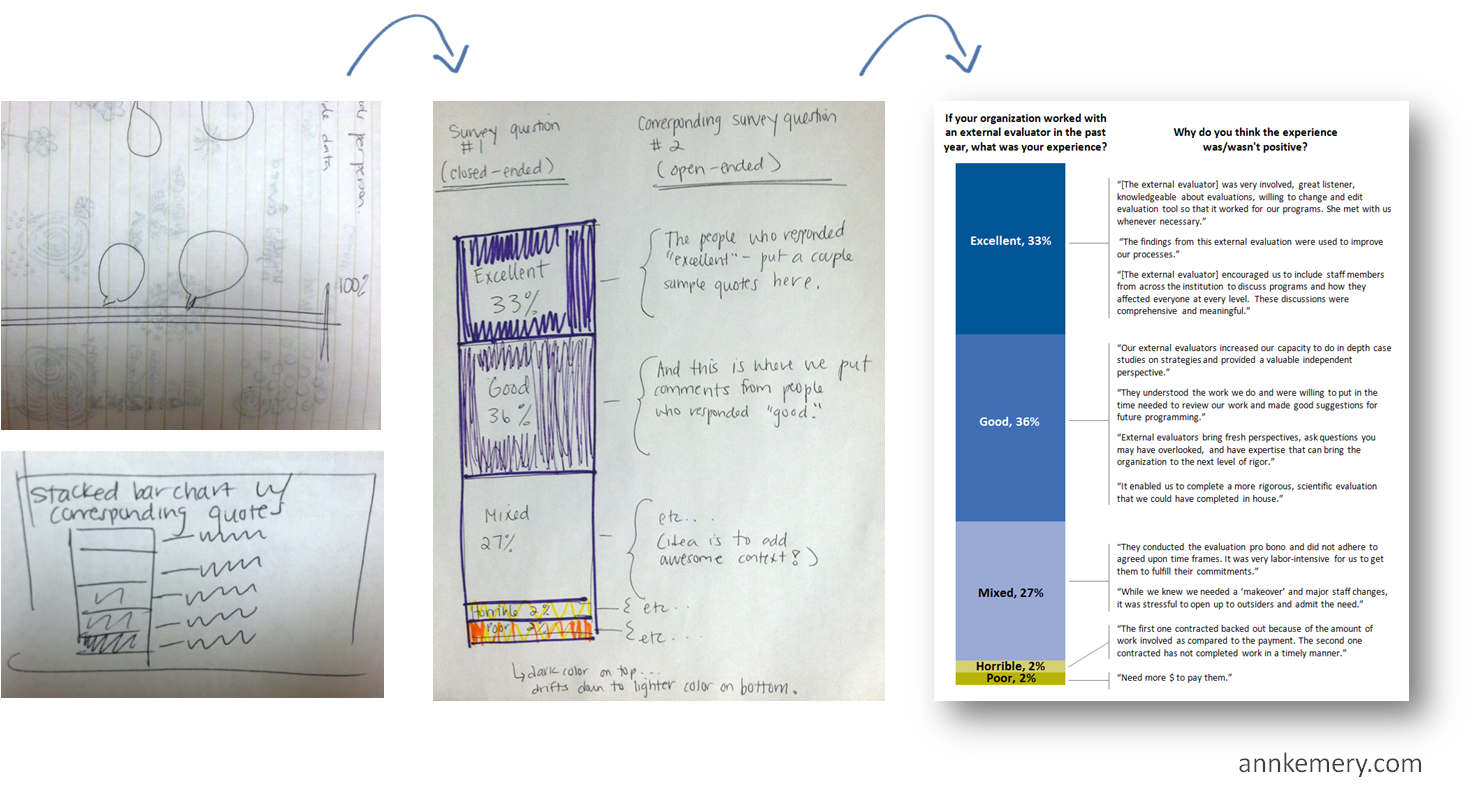
Here’s how it works: First, sketch plenty of rough drafts on paper. Give yourself permission to doodle as many drafts as you need. Share drafts with colleagues early and often. Gather as much feedback as you can. Next, create one or two of those promising drafts on the computer. Finally, edit, edit, edit! Put your easiest-to-follow chart in your final presentation or report. You might sketch five or more drafts. Only the single best chart will survive the editing process.

step1_doodle_b

Step 2: Reduce the clutter

Phew! You survived Step 1, which is all about the critical thinking skills needed to match your chart type and level of precision to your audience’s needs. Steps 2-7 are easy; they’re focused on the technical skills used during the editing process.
Let’s remove the unnecessary ink from the chart. Delete or lighten the border, grid lines, and tick marks. Examine each and every speck of ink on the chart. Does it have a specific purpose? If you can’t articulate a reason for that ink, you don’t need it.
step2_remove_clutter step2_remove_clutter_2
Sometimes reducing clutter means outlining shapes in white, rather than black, so that they match the chart’s background color. I had a good lunch conversation with Stephanie Evergreen about this. I wondered aloud if outlining shapes in white was simply my aesthetic preference or if there was something more to it. Stephanie reminded me that the black outlines aren’t adding new information so they’re essentially messing up the data:ink ratio. (Smart lady!)
step2_remove_clutter_3 step2_remove_clutter_4
If you’re interested in learning more about reducing clutter, read about the data:ink ratio in Edward Tufte’s The Visual Display of Quantitative Information.

Step 3: Directly label

Direct labels mean your bars (or lines, pie wedges, etc.) contain data labels either directly on top of them or directly beside them. Readers’ eye movements aren’t zig-zagging back and forth between the chart data and the legend.
Both remakes below are technically correct. The key is that you don’t need to repeat information. (You wouldn’t label both the horizontal axis and the bars themselves.)
My preference? The second remake, on the bottom. Don’t make your reader hunt for numbers. Direct labels save time and guesswork.
step3_directly_label_

Step 4: Emphasize key findings with color

Colors are one of the most powerful elements of a chart, so choose wisely. There are two steps to choosing colors. First, select a color palette to match your client’s look and feel. Second, guide the reader’s eyes and attention with your action color.

Choose a Custom Color Palette

I’m begging you! Do not use the default colors from Excel, Tableau, or Google Charts. Nothing screams novice! or 2002! more than default color schemes.
If you’re designing charts for a report, handout, or presentation for a client, use their color scheme. Consultants, this means the report will look like it came from the client. It will not have your firm’s look and feel.
In this example, Johanna Morariu and I began by investigating the organization’s logo, website, and publications. Their logo has a distinctive blue, orange, and pink and their publications use dark gray text rather than black. Throughout their website they use color blocks with white text and white outlines. Next, we adapted that layout and color scheme for our slidedoc. The images on the right are separate slides (pages) of the report. The full slidedoc is available at http://workingfamiliessuccess.com/wp-content/uploads/wfsn13_presentation_final_pres.pdf.
step4_custom_color_palette

Emphasize the Takeaway Message with the Action Color

The second step in selecting colors is to guide your reader’s eyes (and therefore, their attention) with an action color. Our eyes are drawn to darker, saturated colors. Use the action color (like the darker blues, greens, or reds from an organization’s logo) to direct your audience’s attention to your most important finding.
Remember to aim for cohesion and consistency between your chart’s title, caption, and action color. You’re not going to emphasize one thing with your action color and write about a different thing in your title. That gets super confusing for everyone.
In this slidedoc example, we showed two findings within a single page. The left side is blue and the right side is pink to show this distinction. Then, we use the action colors to highlight a finding from each chart.
step4_action_color
An exception: You may choose to use color to unify multiple aspects vs. emphasize a single aspect.
In this example, I used the green to unify the key elements from the slide (page) of the slidedoc: the limitations of the study, the brevity of open-ended survey responses, and the box-and-whisker plot itself. The takeaway message is that short survey responses were a limitation of the study generally, not something specific about “positive” or “negative” responses. And of course, the green matches my university’s logo.
step_4_color_consistency
For additional color resources, check out Nominal, Sequential, or Diverging: Simple Strategies for Improving Any Chart’s Colors.

Step 5: State your takeaway message in the title

Why should anyone care about your chart? Tell ’em why in the title.
Here’s how it works: Rather than using a generic title (“Figure 1” or “Number of youth served”), state the takeaway message in the title.
I first learned about this technique through Cole Nussbaumer’s Storytelling with Data workshop back in 2012—but geez, was it tough to apply! This is one of the hardest practices for social scientists to learn because we’re so comfortable with APA formatting and its generic figure titles.
Think Twitter-like and aim for 6-8 word titles. Look to newspaper articles for inspiration; journalists know how to include the “so what?” in their title. You may or may not read the full newspaper story for additional details. Same thing with charts: your audience may or may not read your full chart, so your title must give them the gist of your findings.
Need more details? Of course you do. Add a 2-3 sentence caption underneath the title. You can also add annotations within the chart.
Here’s a great example from Mother Jones. A generic title would’ve been “Number of children living in poverty” or “Relationship between poverty and geographic location.” This 6-word title, “In Climbing Income Ladder, Location Matters,” ensures that readers grasp the chart’s message instantly. A 2-line caption adds more details underneath the title, and a few cities are annotated. The tweet’s text also reinforces this message.


Step 6: Are you doing it right? Test yourself

Woohoo! You’re almost finished. Check your progress with these self-assessments.

The Squint Test

Squint your eyes so that you’re peering at the chart through your eyelashes. Everything should look a little blurry. Can you see the overall shape of the data? For example, you should be able to tell if a line chart is jutting upwards or downwards over time. If not, try removing more clutter.

The Significant Other Test

aka. the Grandmother Test. Give a draft of your chart to a significant other or coworker. Ask, “What’s the central message in this chart?” If they hesitate more than a few seconds, or if their story doesn’t align with your intended story, try working on your title and caption.

… and a third self-check, coming soon!

Stephanie Evergreen and I have something in the works that you’ll surely enjoy. (Editor’s note: It’s here! Check out the Data Visualization Checklist.)

Step 7: Adapt and share your chart

The final step in my Dataviz Design Process is adapting your chart to fit different communications modes, like live presentations, webinars, handouts, and social media.

Charts within live presentations or webinars

During conference presentations, presentations at staff meetings, or webinars, try breaking up your chart into several slides. Think storyboarding or animation. This takes a while to learn, but is well worth the learning curve.
Here’s one example from Cole Nussbaumer about creating “animation.” I’ll be posting examples in future posts. (Editor’s note: Another example is here! Check out this animated video about the Data Visualization and Reporting Topical Interest Group.)

Charts as the star of a one-page handout

We often print our full slideset for our audience. However, these “slideuments,” as Nancy Duarte calls them, are pretty much worthless. Our audience gets lost in pages and pages of details. One strategy is to produce a separate one-page handout with your most important chart. Now, the audience will walk away from your presentation with a crystal clear picture of the key message you wanted them to hear.
step7_adapt_for_handout

Charts shared through Twitter

Planning to tweet a chart or two? Twitter images have a 2:1 aspect ratio. This means that when you’re scrolling through your Twitter feed, the images automatically display about twice as wide as they are tall. Make sure you adjust your charts to fit a 2:1 aspect ratio; otherwise your carefully crafted title will get cut off. Check out the Ultimate Guide to Social Media Image Dimensions for more tips on sizing charts for each channel.
Another consideration is that a chart might be completely wrong for your Twitter followers altogether. An alternative is to overlap findings on photographs, which adds valuable context for the audience.

Charts within dashboards or infographics

Now that you can create a single chart, combine several charts to create a dashboard or infographic. Sometimes people use dashboard and infographic interchangeably, but these visual modes are quite different.
  • Dashboards are for internal audiences (for example, to help directors make decisions about a program’s future) and group several charts together thematically. Dashboards provide key metrics about a program, department, or organization, usually at regular intervals over time (e.g., quarterly reports to your Board of Directors). Charts are often grouped together into similar categories of information—like the students’ reading scores in the first column, their math scores in the second column, and their attendance records in the third column.
  • Infographics are for external audiences (for example, to increase awareness about your issue) and often tell a story from start to finish. While dashboards are often designed as handouts to accompany discussions at meetings, infographics are standalone summaries of information. They’re usually designed for large masses of the general public—not just a handful of key decision makers, like dashboards—so they include plenty of explanatory text. Charts are often grouped together so that you can “read” the story from top to bottom.
Stay tuned for more dashboard tips in future posts.
step7_adapt_for_dashboard_or_infographic

Learn More

This month, I’m speaking about data visualization with YNPN, NeighborWorks, and EPIP. Want me to teach your group about data analysis or visualization? Contact me.